Drupal, Craft CMS, headless: how to choose for a large site. And how to migrate a small brochure site from WordPress to static, with AI.
Two realities. On one side, corporate sites running CMSs such as Drupal, TYPO3 and others, with security, SEO and editorial governance requirements. On the other, WordPress brochure sites costing maintenance, plugins and incidents, for a few pages that change three times a year.
How many pages change, how often, and who edits them? The answer drives the architecture, long before the CMS brand.
Drupal, Craft CMS, headless CMS, server or client rendering. License cost, available skills, SEO impact, security, running cost.
No quotes without a written baseline: content types, roles, languages, integrations, volumes, security requirements. Otherwise bids cannot be compared.
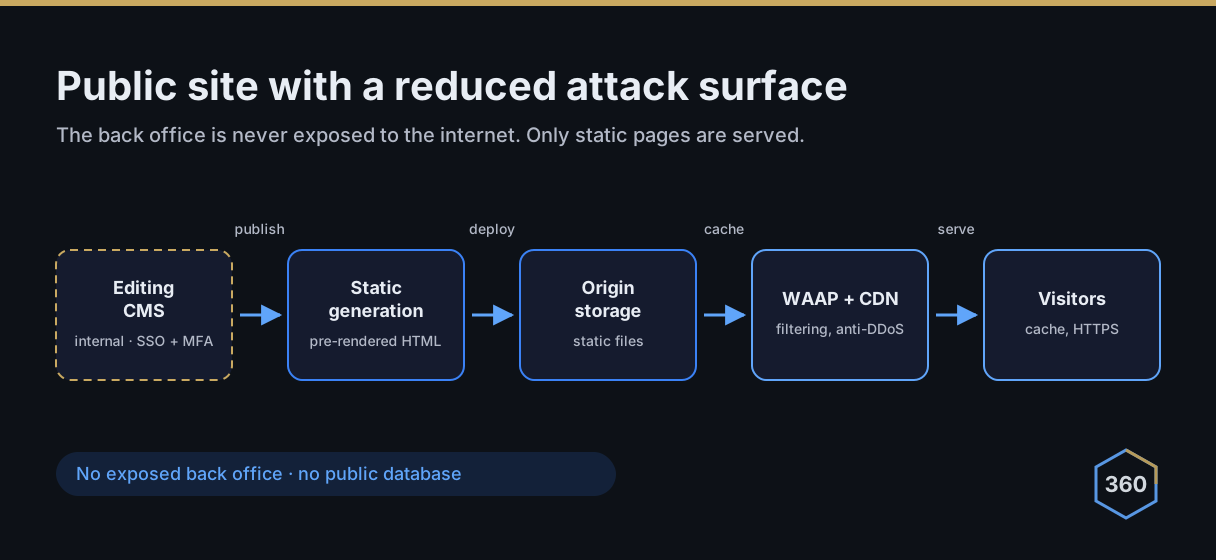
When the company needs its CMS (roles, workflows, languages, volume), going headless separates editing from delivery: the CMS stays internal and unexposed, and the public site is generated, then served behind a load balancer, WAAP and CDN. Gains: performance, a smaller attack surface, fewer dependencies.
Example: the brochure site of a small business. WordPress content extraction, rebuild in HTML and CSS with AI, URL preservation, redirects, WebP images, revised tags and structured data.
Page-by-page comparison, redirect checks, performance and mobile rendering tests, then go live with a rollback option.
On that brochure site: noticeably faster rendering, no database or plugins left to maintain, attack surface reduced to static files. On large sites, headless applies the same logic without giving up the CMS. Want to see my work? Get in touch.
